Chatbot → Agent → Super Agent

Move from answers to owned outcomes.

Start with chat. Add the tools and context to complete work. Promote the right jobs to hosted Super Agents that keep context, run on schedules, and deliver.

Start with chat Add tools when needed Promote recurring work

Weekly revenue brief

Revenue Operations Super Agent

Running
Sunday · 9:00 AMRun 18
Gather pipeline changesComplete
Compare risks and contextComplete
Create the weekly briefComplete
Deliver to the teamReady
weekly-revenue-brief.pdf
Delivered

One product. Three levels of responsibility.

Use only as much agent as the job needs.

The ladder is not about replacing one mode with another. It is about matching autonomy, continuity, and tools to the work.

Revenue Operations

Super Agent command center

Online
Scheduled jobs

Weekly pipeline brief

Sunday · 9:00 AM · Telegram

Memory
Persistent workspace
brief.mdaccounts.csv
Specialist agents
ResearchReview
Browser Computer Traces Artifacts
01 · Chatbot · Ask and answer

Start with a useful conversation.

Choose a model, attach a file, and work through an idea in chat. You stay in the loop and decide what happens next.

Best for
Questions, drafts, analysis, and one-time decisions
Result
A clear answer
  • Multi-model chat
  • File attachments
  • Voice input and output
  • Conversation history

New conversation

Model and files selected by you

Compare this customer interview with our product brief. What should we fix first?
The interview points to one urgent gap: operators cannot see when the handoff is complete. I would fix outcome visibility before adding another setup option.
customer-interview.pdf2.4 MB

02 · Agent · Give it a job

Turn the conversation into work.

Give an agent a responsibility, private knowledge, tools, and reusable skills. It can research, update systems, and return files with the steps visible.

Best for
Repeatable work that still starts with you
Result
Work completed with evidence
  • Named responsibility and instructions
  • Private knowledge and reusable skills
  • Connected tools and browser actions
  • Visible tool traces and generated artifacts
AGENT

Account follow-up

Research the account, update the CRM, and prepare the next step.

KnowledgeCRMFiles

Visible work trace

Complete
Searched the account history12 records
Updated the CRM opportunityComplete
Created the follow-up briefPDF
account-follow-up.pdf
03 · Super Agent · Keep the work moving

Give the job continuity.

A Super Agent runs in a dedicated hosted environment with memory, a persistent workspace, browser access, schedules, and delivery channels. It can delegate scoped work to specialist agents while the main agent owns the outcome.

Best for
Recurring operations that cannot depend on an open tab
Result
A managed operating loop
  • Dedicated hosted environment and browser
  • Persistent workspace, files, and memory
  • Schedules with chat or Telegram delivery
  • Traces, artifacts, and specialist agents

Revenue Operations

Super Agent command center

Online
Scheduled jobs

Weekly pipeline brief

Sunday · 9:00 AM · Telegram

Memory
Persistent workspace
brief.mdaccounts.csv
Specialist agents
ResearchReview
Browser Computer Traces Artifacts

The operator loop

You set the outcome. The worker carries the context.

Reliable work is not one clever prompt. It is a clear job, the right access, a repeatable run, and evidence you can inspect.

01

Define the work

Name the result, the source material, the boundary, and the point where a person should review it.

02

Connect context and tools

Add private knowledge, reusable skills, files, browser access, and the business systems required for the job.

03

Run on demand or on schedule

Start from chat, keep longer work running in the background, or schedule a Super Agent to begin without an open tab.

04

Review the evidence

Inspect traces, tool calls, generated artifacts, files, and delivery history before you act on the result.

Current product, visible work

Connect the systems. Schedule the outcome.

These are current Agentic Workers product surfaces—not decorative concepts.

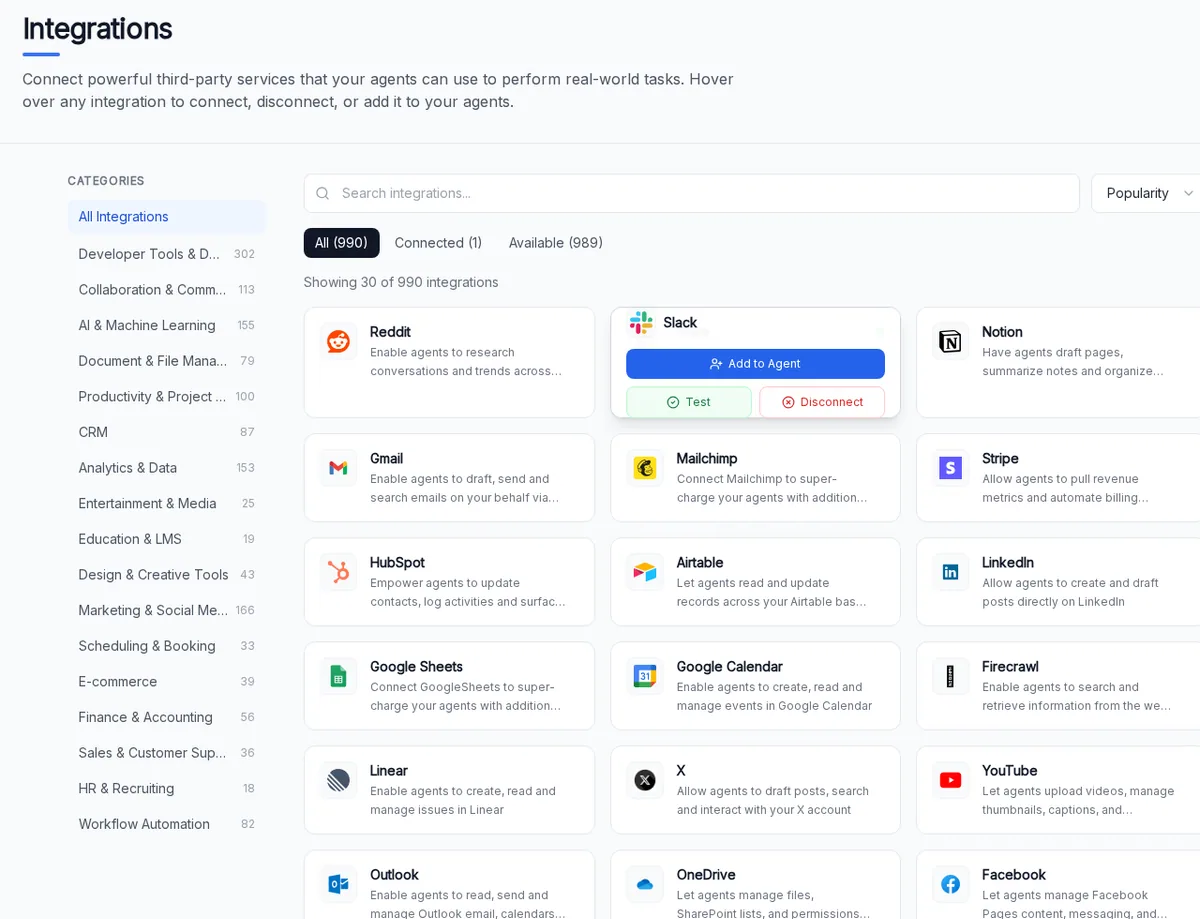
Agentic Workers integrations catalog showing connected business tools including Slack, Gmail, Notion, HubSpot, Google Sheets, Linear, and Firecrawl
Tools for real work. Connect the services an agent needs, then add only the relevant ones to its job.
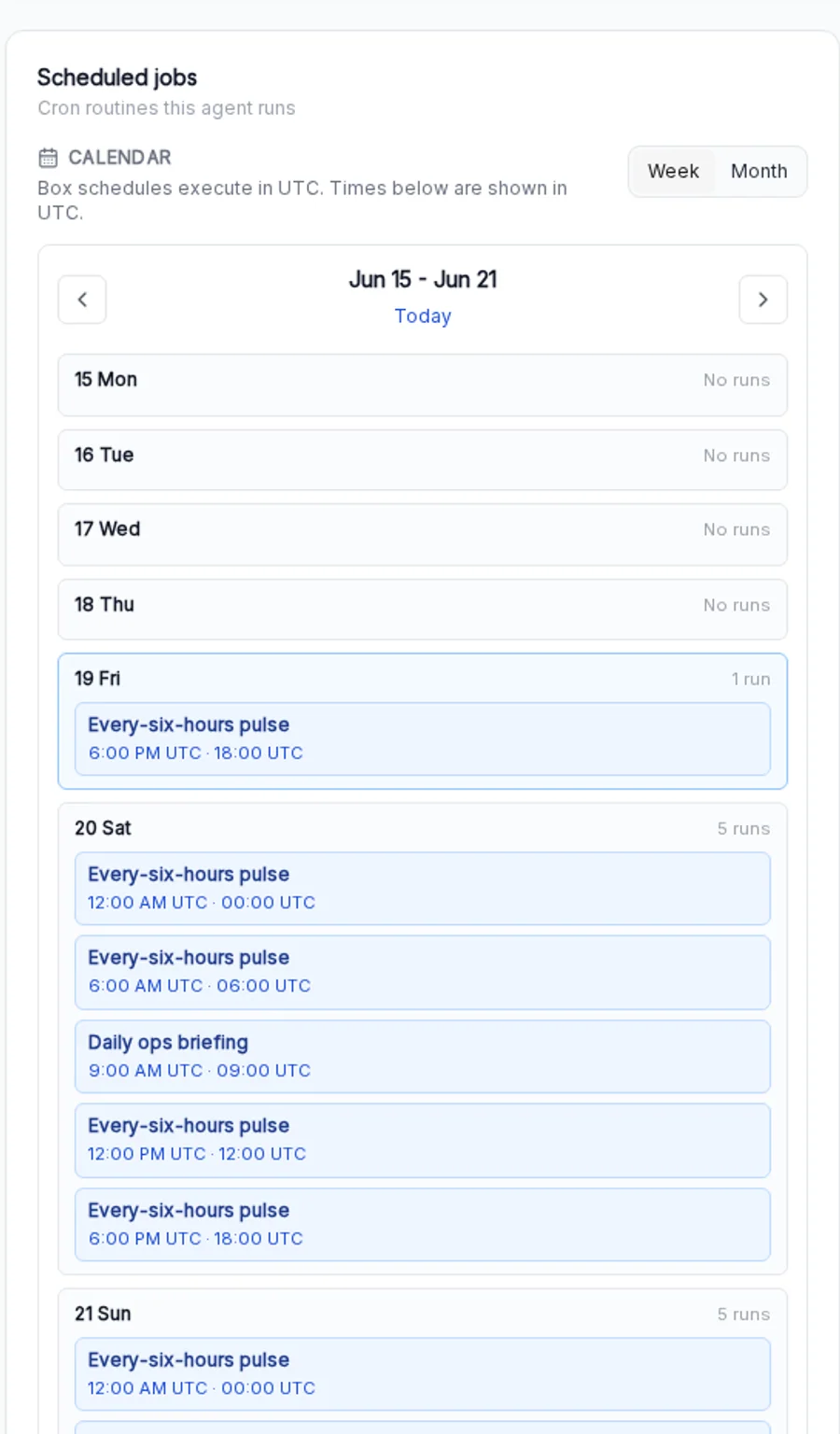
Agentic Workers weekly Scheduled Jobs calendar showing recurring pulse and daily operations briefing runs
Work that starts on time. See recurring runs on a weekly or monthly calendar.

Control is part of the workflow.

Agentic Workers keeps the work, configuration, and evidence close to the operator. We describe the controls that ship today—not a future compliance checklist.

See what happened

Tool traces and run history show the steps behind each result.

Review sensitive actions

When approval controls are enabled for your workspace, selected write actions pause so you can approve, reject, or trust the tool.

Keep work contained

Each Super Agent has its own hosted environment, workspace, configuration, and connected services.

Choose where results arrive

Keep output in Super Agent chat or deliver scheduled work to Telegram when configured.

GmailSlackGoogle SheetsGoogle DriveNotionLinearHubSpotFirecrawl

Questions, answered plainly

Know what you are handing over.

Frequently asked questions

What is the difference between a Chatbot, an Agent, and a Super Agent?

A Chatbot helps you think and create in a conversation. An Agent adds a defined responsibility, private context, tools, and reusable skills so it can complete work. A Super Agent adds a dedicated hosted environment, persistent workspace and memory, schedules, delivery channels, and the ability to delegate scoped work to specialist agents.

Do I need to start with a Super Agent?

No. Start in chat when you need an answer. Create an Agent when a repeated job needs tools or business context. Promote the work to a Super Agent when it needs continuity, scheduled runs, persistent files, or delivery without an open browser tab.

Can agents use my existing business tools?

Yes. Agentic Workers includes an integrations catalog for supported business services such as Gmail, Slack, Notion, HubSpot, Google Sheets, Linear, and Firecrawl. The tools available to an agent depend on what you connect and configure.

How does scheduled work run?

Scheduled jobs run in a Super Agent’s hosted environment. You can inspect recurring work on a weekly or monthly calendar and configure results to remain in Super Agent chat or be delivered to Telegram where supported.

Can I see what an agent did?

Yes. Current product surfaces expose run activity, tool traces, files, and generated artifacts so an operator can inspect the work behind a result. The exact evidence available depends on the action and agent configuration.

Can an agent use private company knowledge?

Yes. Add knowledge, files, memory, and reusable skills to give an agent the business context it needs. Capacity and sharing options depend on your plan and workspace configuration.

Start small. Promote what works.

What recurring process should stop depending on you?

Begin in chat. Add an agent when the job needs tools and context. Promote it when continuity creates the value.